
To understand what it is, I will tell you for the first time that the lamp is a deficiency for Linux, Apache, MySQL, PHP and in this tutorial I will explain how to install a webserver apache2 with mysql support on a server which installed the Centos 5.6 operating system. I will use Server.examplu.ro hostname with the 192.168.0.100 address, these examples will be changed by you with those you need.
A. Installation of MySQL:
To install mysql we use the command:
yum install mysql mysql-server
So we create the Start -up of the system for the MySQL server (which MySQL automatically starts every time of the cut server) and starts the MySQL server.
chkconfig --levels 235 mysqld on
/etc/init.d/mysqld start
We set the password for the Root MySQL user
mysql_secure_installation
Note: execution of all parts of this script is recommended for all MySQL
Server in the use of production! Please read every step carefully!
To access MySQL to protect it, we will need the current
Password for the root user. If you have just installed mysql e
You have not yet set the Root password, the password will be empty,
So you should just press Enter here.
Enter the current password for root (enter anyone):
Ok, password used successfully, moving …
The Root password setting guarantees that nobody can access the MySQL
user root without the correct authorization.
Set the root password? [Y/n]
New password: Returning new password: Password updated correctly!
Charging privilege tables ..
… Success!
By default, a MySQL installation has an anonymous user, which allows anyone
To access MySQL without having to have a user account created for
They. This is intended only for tests and to install
go a little more fluid. You should remove them before moving in a
production environment.
Remove anonymous users? [Y/n] … Success!
Normally, root should only be allowed to connect from «local». This
It ensures that someone cannot guess Root’s password from the net.
Not allowing access at the root remotely? [Y/n] … Success!
By default, MySQL is provided with a database called «test» that anyone can
access. This is also intended only for tests and should be removed
Before moving to a production environment.
Remove the test database and access it? [Y/n]
– Droping test database …
… Success!
– Removal of privileges on the test database …
… Success!
Reloading the privileges tables will guarantee all the changes made so far
Will come into force immediately.
Recharge the privileged tables now? [Y/n] … Success!
Clean …
All done! If you have completed all the previous steps, your MySQL
The installation should now be safe.
Thanks for using MySQL!
[root@server1 ~]#B. Installation of Apache2:
Apache2 is located in the list of Centos packages and can be installed using the following orders:
yum install httpd
Now configure the Apache server to start with the system:
chkconfig --levels 235 httpd on
… and Apache begins
/etc/init.d/httpd start
Now access the address in the browser and you will find the simple apache page
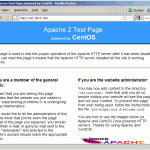
The root position of the Apache server is/lime/www/html in centos and the configuration file is /etc/httpd/conf/httpd.conf. The additional configurations are archived in the directory/etc/httpd/conf.D/.
C. PHP5 installation:
We can install PHP5 or PHP5 Apache modules as follows:
yum install php
After that the Apache server must be restarted
/etc/init.d/httpd restart
D. Test Php5 and Installation Details
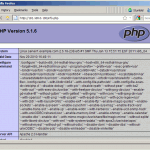
The website root document is/lime/www/html. Now we will create a small PHP file in this document (info.php) and we will access it from a browser. This file provides us with many details on the installation of PHP, details such as the installed PHP version.
vi /var/www/html/info.php
File content:
<?php phpinfo(); ?>
Now we can access this page in a browser (example: /info.php)
E. Get MySQL support in PHP5:
To obtain MySQL support in PHP5 we can install the PHP-Mysql package. You can install other PHP5 modules because they will use you in various applications. Search PHP5 modules like this:
yum search php
Choose the modules you need and then install them in this way:
yum install php-mysql php-gd php-imap php-ldap php-odbc php-pear php-xml php-xmlrpc
Now restart apache2
/etc/init.d/httpd restart
Reload the /info.php page from the browser and scroll through the page, now you will find all the modules installed including MySQL.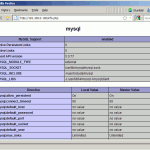
F. PHPMYADmin
Myphpadmin is a web interface with which the MySQL database can be administered.
In the first phase, activate the RPMFORGGE repository on the Centos system because PHPMYADmin is not available in the Centos 5.6 official list.
For X84 64 systems:
wget http://packages.sw.be/rpmforge-release/rpmforge-release-0.5.2-2.el5.rf.x86_64.rpm
rpm -Uhv rpmforge-release-0.5.2-2.el5.rf.x86_64.rpm
For i386 systems:
wget http://packages.sw.be/rpmforge-release/rpmforge-release-0.5.2-2.el5.rf.i386.rpm
rpm -Uhv rpmforge-release-0.5.2-2.el5.rf.i386.rpm
Phpmyadmin can be installed as follows:
yum install phpmyadmin
Now we have set phpmyadmin. The configuration of the Apache server has modified so that phpmyadmin knows supports connections not only from the local network (we can do it by commenting on the line
vi /etc/httpd/conf.d/phpmyadmin.conf
#
#  Web application to manage MySQL
#
#
#  Order Deny,Allow
#  Deny from all
#  Allow from 127.0.0.1
#
Alias /phpmyadmin /usr/share/phpmyadmin
Alias /phpMyAdmin /usr/share/phpmyadmin
Alias /mysqladmin /usr/share/phpmyadmin
Now we have to change the way authentication is performed in phpmyadmin from cookie in http:
vi /usr/share/phpmyadmin/config.inc.php
[...]/* Authentication type */
$cfg['Servers'][$i]['auth_type'] = 'http';
[...]
Remained Apache:
/etc/init.d/httpd restart
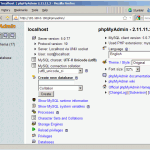
Now you can access phpmyaadmin at the address /phpmyadmin /:
Congratulations! You just finished configuring the lamp server.
PS: If you want a car specially built, functions such as server, access the used servers category. If you just want to test these programs, you can use a normal computer!
Post views:
2.683
latest posts published

Don’t know which decoration to choose for your wedding? See ideas here | Your wedding at the castle

Guide to managing your wedding budget

When does the baby’s baptism take place? Guide 2026

Choose the menu according to your budget!

Greșeli organizare nuntă – 9 Mistakes that ruin your wedding

Top 5 reasons to call a wedding specialist

Everything you need for the mystery of baptism

Civil and religious marriage documents 2026

Fun activities for a successful baptism
